title: 基于ReactiveCocoa和MVVM設計的購物車基本操作實現代碼解析
categories: iOS
tags:
    -ReactiveCocoa
    -MVVM
    -購物車
{% cq %}
購物車單選全選價格計算數量增刪等等操作...RAC皆統(tǒng)統(tǒng)搞定.就是這么cool~
{% endcq %}
開始之前你需要了解的
配置CocoaPods
安裝CocoaPods命令
gem install cocoapods ##使用RVM安裝的Ruby不需要sudo
配置ReactiveCocoa
然后在你的Podfile添加一下代碼
platform :ios, '8.0'
use_frameworks!

target '你的項目工程名' do
  pod 'ReactiveCocoa'
end
最后輸入命令安裝
pod install
另外常用的pod 命令
pod install --verbose --no-repo-update       ##安裝不更新的
pod update --verbose --no-repo-update        ##更新需要更新的
打開 你的項目工程名.xcworkspace 即可~
RAC在此我就不仔細介紹了,先推薦幾遍文章:
Mattt Thompson寫的Reactive?Cocoa
Ash Furrow寫的 Getting Started with ReactiveCocoa
了解MVVM
Google了看幾篇有關的文章
MVVM 介紹 譯 朱宏旭
簡單的介紹一下:
M:model放一些數據模型
V:view視圖
V:viewcontroller控制器
VM:viewmodel主要做處理邏輯和處理數據
開始著手代碼
項目演示
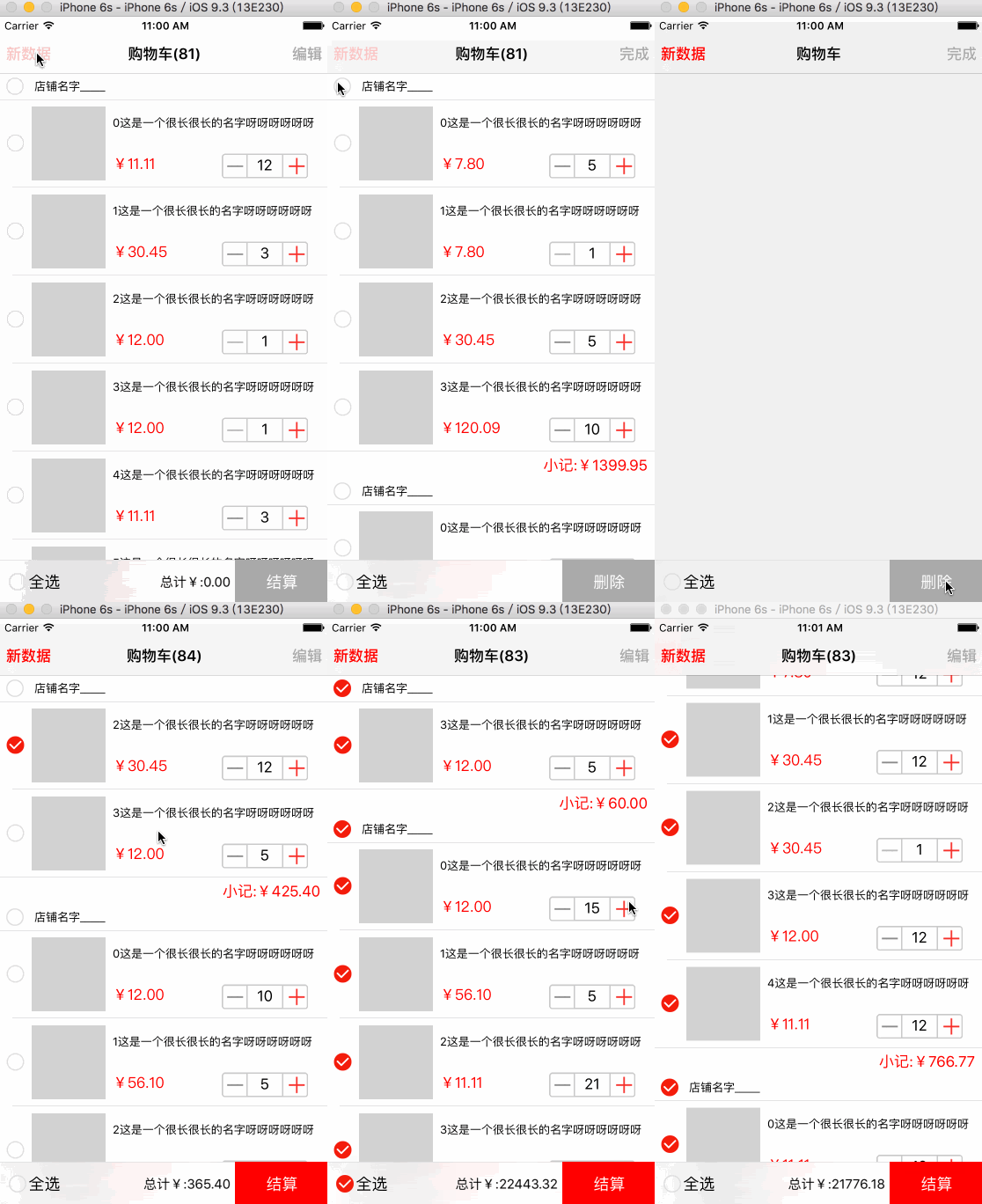
項目搭建框架
整體文件目錄按照模塊分一下子文件
ViewController :
    ViewController              ##加載視圖事件監(jiān)聽等等
Model :
    model                       ##基本數據模型
View :
    cell                        ##cell
    numbercount                 ##封裝加減控件
    header                      ##店鋪之類
    footer                      ##小結
    cartbar                     ##封裝購物車底部view
ViewModel :
    service                     ##抽離tableview的datasource和delegate
    viewmodel                   ##處理主要的邏輯和數據
viewmodel類方法屬性解析
獲取數據方法
1.循環(huán)20個從0到5之間隨機取數組里取值加到最終的cartData數組里
2.店鋪選擇shopSelectArray默認NO狀態(tài)
3.統(tǒng)計總共購物車數量cartGoodsCount
- (void)getData{
    //數據個數
    NSInteger allCount = 20;
    NSInteger allGoodsCount = 0;
    NSMutableArray *storeArray = [NSMutableArray arrayWithCapacity:allCount];
    NSMutableArray *shopSelectAarry = [NSMutableArray arrayWithCapacity:allCount];
    //創(chuàng)造店鋪數據
    for (int i = 0; i<allCount; i++) {
        //創(chuàng)造店鋪下商品數據
        NSInteger goodsCount = [_shopGoodsCount[self.random] intValue];
        NSMutableArray *goodsArray = [NSMutableArray arrayWithCapacity:goodsCount];
        for (int x = 0; x<goodsCount; x++) {
            JSCartModel *cartModel = [[JSCartModel alloc] init];
            cartModel.p_id         = @"122115465400";
            cartModel.p_price      = [_goodsPriceArray[self.random] floatValue];
            cartModel.p_name       = [NSString stringWithFormat:@"%@這是一個很長很長的名字呀呀呀呀呀呀",@(x)];
            cartModel.p_stock      = 22;
            cartModel.p_imageUrl   = _goodsPicArray[self.random];
            cartModel.p_quantity   = [_goodsQuantityArray[self.random] integerValue];
            [goodsArray addObject:cartModel];
            allGoodsCount++;
        }
        [storeArray addObject:goodsArray];
        [shopSelectAarry addObject:@(NO)];
    }
    self.cartData = storeArray;
    self.shopSelectArray = shopSelectAarry;
    self.cartGoodsCount = allGoodsCount;
}
獲取當前選中價格總和方法
對cartData數組轉信號流然后map自定義需求return,期間自定義需求參數value 再次轉信號流經過filter篩選未選中使isSelectAll為NO,然后經過map自定義需求使model.p_quantity*model.p_price得到的商品總價返回,最終return得到商品總價數組pricesArray.
快速遍歷pricesArray得出總價allPrices
- (float)getAllPrices{

    __block float allPrices   = 0;
    NSInteger shopCount       = self.cartData.count;
    NSInteger shopSelectCount = self.shopSelectArray.count;
    if (shopSelectCount == shopCount && shopCount!=0) {
        self.isSelectAll = YES;
    }
    NSArray *pricesArray = [[[self.cartData rac_sequence] map:^id(NSMutableArray *value) {
        return [[[value rac_sequence] filter:^BOOL(JSCartModel *model) {
            if (!model.isSelect) {
                self.isSelectAll = NO;
            }
            return model.isSelect;
        }] map:^id(JSCartModel *model) {
            return @(model.p_quantity*model.p_price);
        }];
    }] array];
    for (NSArray *priceA in pricesArray) {
        for (NSNumber *price in priceA) {
            allPrices += price.floatValue;
        }
    }

    return allPrices;
}
全選yes or not
shopSelectArray轉流map定義需求isSelect為YES的對象然后return 成可變數組.
cartData轉流map定義需求,對其參數value轉流map定義需求KVC使model的isSelect屬性為YES,再次計算記錄總價allPrices.return再return成可變數組.
- (void)selectAll:(BOOL)isSelect{

     __block float allPrices = 0;

    self.shopSelectArray = [[[[self.shopSelectArray rac_sequence] map:^id(NSNumber *value) {
        return @(isSelect);
    }] array] mutableCopy];
    self.cartData = [[[[self.cartData rac_sequence] map:^id(NSMutableArray *value) {
        return  [[[[value rac_sequence] map:^id(JSCartModel *model) {
                [model setValue:@(isSelect) forKey:@"isSelect"];
            if (model.isSelect) {
                allPrices += model.p_quantity*model.p_price;
            }
            return model;
        }] array] mutableCopy];
    }] array] mutableCopy];
    self.allPrices = allPrices;
    [self.cartTableView reloadData];
}
單行選擇處理方法
KVC設置model的isSelect為YES,做店鋪下商品選中滿判斷
- (void)rowSelect:(BOOL)isSelect IndexPath:(NSIndexPath *)indexPath{

    NSInteger section          = indexPath.section;
    NSInteger row              = indexPath.row;

    NSMutableArray *goodsArray = self.cartData[section];
    NSInteger shopCount        = goodsArray.count;
    JSCartModel *model         = goodsArray[row];
    [model setValue:@(isSelect) forKey:@"isSelect"];
    //判斷是都到達足夠數量
    NSInteger isSelectShopCount = 0;
    for (JSCartModel *model in goodsArray) {
        if (model.isSelect) {
            isSelectShopCount++;
        }
    }
    [self.shopSelectArray replaceObjectAtIndex:section withObject:@(isSelectShopCount==shopCount?YES:NO)];

    [self.cartTableView reloadSections:[NSIndexSet indexSetWithIndex:section] withRowAnimation:UITableViewRowAnimationNone];

    /*重新計算價格*/
    self.allPrices = [self getAllPrices];
}
單行數量處理方法
KVC處理model.再次調用getAllPrices方法計算總價
- (void)rowChangeQuantity:(NSInteger)quantity indexPath:(NSIndexPath *)indexPath{

    NSInteger section  = indexPath.section;
    NSInteger row      = indexPath.row;

    JSCartModel *model = self.cartData[section][row];

    [model setValue:@(quantity) forKey:@"p_quantity"];

    [self.cartTableView reloadSections:[NSIndexSet indexSetWithIndex:section] withRowAnimation:UITableViewRowAnimationNone];

    /*重新計算價格*/
    self.allPrices = [self getAllPrices];
}
左滑刪除商品
數組刪除,做店鋪下商品刪除完判斷處理
- (void)deleteGoodsBySingleSlide:(NSIndexPath *)path{

    NSInteger section = path.section;
    NSInteger row     = path.row;

    NSMutableArray *shopArray = self.cartData[section];
    [shopArray removeObjectAtIndex:row];
    if (shopArray.count == 0) {
        /*1 刪除數據*/
        [self.cartData removeObjectAtIndex:section];
        /*2 刪除 shopSelectArray*/
        [self.shopSelectArray removeObjectAtIndex:section];
        [self.cartTableView reloadData];
    } else {
        [self.cartTableView reloadSections:[NSIndexSet indexSetWithIndex:section] withRowAnimation:UITableViewRowAnimationNone];
    }
    self.cartGoodsCount-=1;
    /*重新計算價格*/
    self.allPrices = [self getAllPrices];
}
刪除選中處理方法
創(chuàng)建可變集合shopSelectIndex,遍歷cartData,遍歷shopArray,取得選中的index2加到selectIndexSet中,做店鋪count和選中商品相等判斷,index1加到shopSelectIndex中,cartGoodsCount做遞減處理,然后依次shopArray做刪除操作,cartData在循環(huán)外刪除操作,shopSelectArray在循環(huán)外刪除操作,價格為0,重新計算價格
- (void)deleteGoodsBySelect{

    /*1 刪除數據*/
    NSInteger index1 = -1;
    NSMutableIndexSet *shopSelectIndex = [NSMutableIndexSet indexSet];
    for (NSMutableArray *shopArray in self.cartData) {
        index1++;

        NSInteger index2 = -1;
        NSMutableIndexSet *selectIndexSet = [NSMutableIndexSet indexSet];
        for (JSCartModel *model in shopArray) {
            index2++;
            if (model.isSelect) {
                [selectIndexSet addIndex:index2];
            }
        }
        NSInteger shopCount = shopArray.count;
        NSInteger selectCount = selectIndexSet.count;
        if (selectCount == shopCount) {
            [shopSelectIndex addIndex:index1];
            self.cartGoodsCount-=selectCount;
        }
        [shopArray removeObjectsAtIndexes:selectIndexSet];
    }
    [self.cartData removeObjectsAtIndexes:shopSelectIndex];
    /*2 刪除 shopSelectArray*/
    [self.shopSelectArray removeObjectsAtIndexes:shopSelectIndex];
    [self.cartTableView reloadData];
    /*3 carbar 恢復默認*/
    self.allPrices = 0;
    /*重新計算價格*/
    self.allPrices = [self getAllPrices];
}
VC做監(jiān)聽觀察處理
全選
 [[self.cartBar.selectAllButton rac_signalForControlEvents:UIControlEventTouchUpInside] subscribeNext:^(UIButton *x) {
        x.selected = !x.selected;
        [self.viewModel selectAll:x.selected];
    }];
刪除
[[self.cartBar.deleteButton rac_signalForControlEvents:UIControlEventTouchUpInside] subscribeNext:^(UIButton *x) {
    [self.viewModel deleteGoodsBySelect];
}];
結算
[[self.cartBar.balanceButton rac_signalForControlEvents:UIControlEventTouchUpInside] subscribeNext:^(UIButton *x) {

    }];
觀察價格屬性
WEAK
[RACObserve(self.viewModel, allPrices) subscribeNext:^(NSNumber *x) {
    STRONG
    self.cartBar.money = x.floatValue;
}];
全選狀態(tài)
RAC(self.cartBar.selectAllButton,selected) = RACObserve(self.viewModel, isSelectAll);
title購物車數量
[RACObserve(self.viewModel, cartGoodsCount) subscribeNext:^(NSNumber *x) {
   STRONG
    if(x.integerValue == 0){
        self.title = [NSString stringWithFormat:@"購物車"];
    } else {
        self.title = [NSString stringWithFormat:@"購物車(%@)",x];
    }

}];
總結
主要的方法我都一一講了很清楚,具體的怎么調用,可以到service里,cell里,控件里看,寫了這么一大堆,如果你還有什么不懂,或者有更好的建議請留言,或者到我的github上issue我,如果我寫的對你有些幫助,請給予辛勞的博主一些打賞,謝謝~
