AJAX Introduction
By Ajax, we can:
- Update a web page without reloading the page
- Request data from a server - after the page has loaded
- Receive data from a server - after the page has loaded
- Send data to a server in the background
What's AJAX?
AJAX = Asynchronous Javascript And XML.
AJAX is not a programming language, it just uses a combination of:
- A browser built-in
XMLHttpRequestobject(to request data from a web server) - Javascript and HTML DOM(to display or use the data)
AJAX is a misleading name. AJAX applications might use XML to transport data, but it is equally common to transport data as plain text or JSON text.
How AJAX Works?
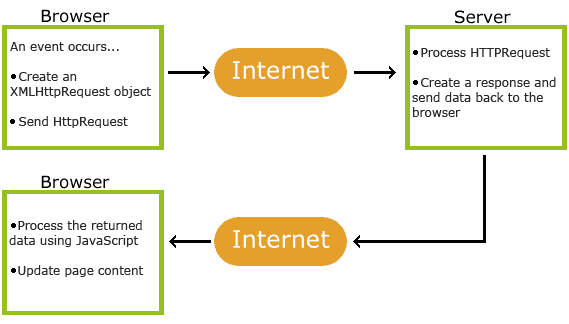
AJAX XMLHttp
The XMLHttpRequest Object
All modern browsers support the XMLHttpRequest object.
The XMLHttpRequest object is used to exchange data with a server behind the scenes. This means that it's possible to update parts of a web page, without reloading the whole page.
Create an XMLHttpRequest Object
All mordern browsers have a built-in XMLHttpRequest object, old versions of IE(5,6) use an ActiveX Object.
var xhttp;
if (window.XMLHttpRequest) {
    xhttp = new XMLHttpRequest();
    } else {
    // code for IE6, IE5
    xhttp = new ActiveXObject("Microsoft.XMLHTTP");
}
Access Across Domains
For security reasons, modern browsers do not allow access across domains. This means that both the web page and the XML file it tries to load must be located on the same server.
AJAX Request
The XMLHttpRequest object is used to exchange data with a server.
Send a Request To a server
To send a request to server, we use the open() and send() methods of the XMLHttpRequest object:
//method: the type of request: GET or POST
//url: the server location
//async: true(asynchronous) or false(synchronous)
xhttp.open(method, url, async);
xhttp.send();
GET example
xhttp.open("GET", "demo_get2.php?fname=Henry&lname=Ford", true);
xhttp.send();
POST example
To POST data like an HTML form, add an HTTP header with setRequestHeader(). Specify the data you want to send in the send() method.
xhttp.open("POST", "ajax_test.asp", true);
xhttp.setRequestHeader("Content-type", "application/x-www-form-urlencoded");
xhttp.send("fname=Henry&lname=Ford");
AJAX - Server Response
The onreadystatechange Property
The readyState property holds the status of the XMLHttpRequest.
The onreadystatechange property defines a function to be executed when the readyState changes.
The status property and the statusText property holds the status of the XMLHttpRequest object.
The onreadystatechange function is called every time the readyState changes.
When readyState is 4 and status is 200, the response is ready:
function loadDoc() {
    var xhttp = new XMLHttpRequest();
    xhttp.onreadystatechange = function() {
        if (this.readyState == 4 && this.status == 200) {
            document.getElementById("demo").innerHTML =
            this.responseText;
       }
    };
    xhttp.open("GET", "ajax_info.txt", true);
    xhttp.send();
}
The onreadystatechange event is triggered five times(0~4), one time for each change in readyState.
Using callback function
If you have more that one AJAX task in a website, you should create one function for executing the XMLHttpRequest object, and one callback function for each AJAX task.
loadDoc("url-1", myFunction1);

loadDoc("url-2", myFunction2);

function loadDoc(url, cFunction) {
  var xhttp;
  xhttp=new XMLHttpRequest();
  xhttp.onreadystatechange = function() {
    if (this.readyState == 4 && this.status == 200) {
      cFunction(this);
    }
 };
  xhttp.open("GET", url, true);
  xhttp.send();
}

function myFunction1(xhttp) {
  // action goes here
}
function myFunction2(xhttp) {
  // action goes here
}
Server Response Properties and method
- responseText: get the response data sa a string
- responseXML: get the reponse data as XML data.
- getResponseHeader(): Returns specific header information from the server resource.
- getAllResponseHeaders(): Returns all the header infomation from the server resource.
